Source Review
We confirm drawing revision, units, projection method, component boundaries and the expected native and exchange deliverables.
A neutral 3D solid may show the correct shape but still be unsuitable for a team that needs to change dimensions, manage configurations, update drawings or reuse features. Native SolidWorks files carry structure: sketches, features, references, properties, configurations and relationships that influence how efficiently a model can be reviewed and maintained.
CAD Conversion Services India provides SolidWorks 3D modeling services for product manufacturers, equipment builders, mechanical engineers and fabrication businesses. We create or rebuild SolidWorks parts, assemblies, surfaces and related drawings from approved 2D information, sketches, legacy models, measurements and client-issued design instructions.
Our offshore team starts by defining how the files will be used after delivery. This determines whether the assignment needs simple solid geometry, an editable feature tree, configurable variants, assembly relationships or drawing-linked properties. We build the agreed CAD output while the client’s authorised professionals retain responsibility for design calculations, materials, tolerances, safety, testing and release approval.
Confirm these essentials before production begins.
Sketches, legacy drawings, samples, measurements and approved engineering instructions
Parts, assemblies, production drawings, BOMs and agreed exchange files
SolidWorks, AutoCAD and agreed mechanical CAD formats
Native SolidWorks parts and assemblies intended for controlled downstream drawing and manufacturing use.
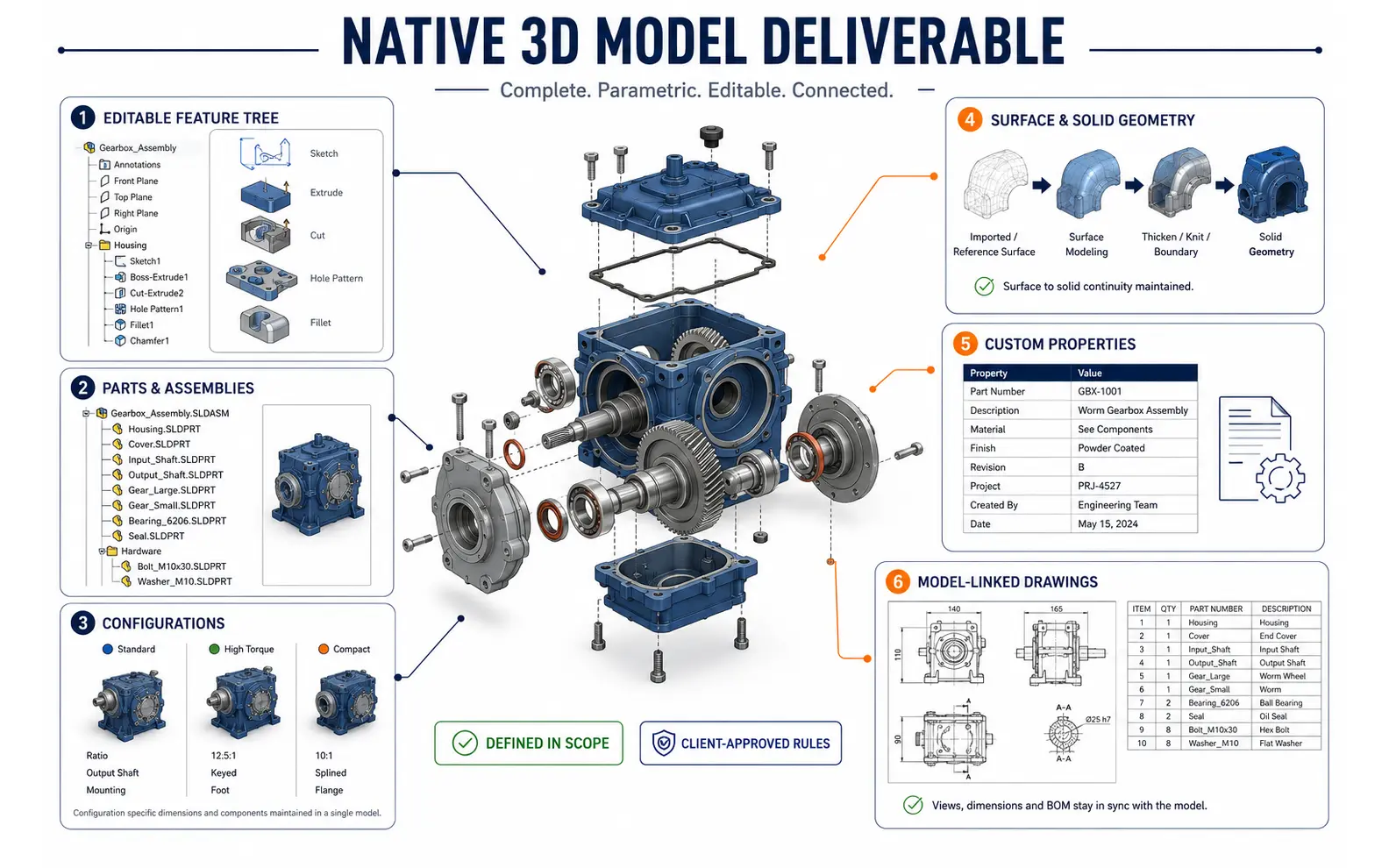
SolidWorks projects range from a single component reconstructed from a dimensioned drawing to a multi-level machine assembly with hundreds of references. The scope must identify which native elements matter and which information will be supplied by the client.
Our capabilities can include:
“Manufacturing-ready” is not a universal model status. For one client, it may mean complete geometry and model-linked drawings. For another, it may require approved custom properties, configurations and fabrication data. The term does not imply that manufacturing feasibility or regulatory compliance has been independently certified.
Feature order affects how a part responds when dimensions change. We plan the model around the available design information and the client’s expected editing method. Base features, patterns, cuts, fillets, holes and reference geometry are arranged to reduce fragile relationships where practical.
An experienced modeler can reproduce approved dimensional relationships and name features according to client conventions. If the drawing does not reveal design intent, the team raises a query rather than choosing a relationship that merely looks convenient.
For reconstructed imported geometry, the scope should distinguish between direct feature recognition, selective feature recreation and a full rebuild. Each approach offers a different level of editability and requires different review effort.
Configurations can reduce duplicated files when a product family shares controlled geometry. They can also create confusion if suppression states, dimensions, names and properties are not governed consistently.
Where the client supplies approved variant rules, we can create configurations, design-table-driven values or separate model structures as appropriate. A qualified reviewer checks that each required configuration resolves correctly and that its identifiers and properties match the issued schedule. The client remains responsible for confirming that every variant is technically valid.
SolidWorks surface modeling may be needed for housings, covers, ducts, guards or products with complex transitions. We can build approved surfaces from suitable profiles, guide curves, sections or scan-derived references and convert them into solids where the geometry permits.
Surface work is sensitive to incomplete source information. Visible appearance alone cannot establish precise curvature, wall thickness or interface conditions. Open or contradictory definitions are reported for client clarification before they become embedded in the model.
Native files can carry part numbers, descriptions, material references, project codes and other approved attributes used by drawings or bills of materials. We populate only the fields included in the project instructions and check that configuration-specific values appear in the intended model and drawing locations.
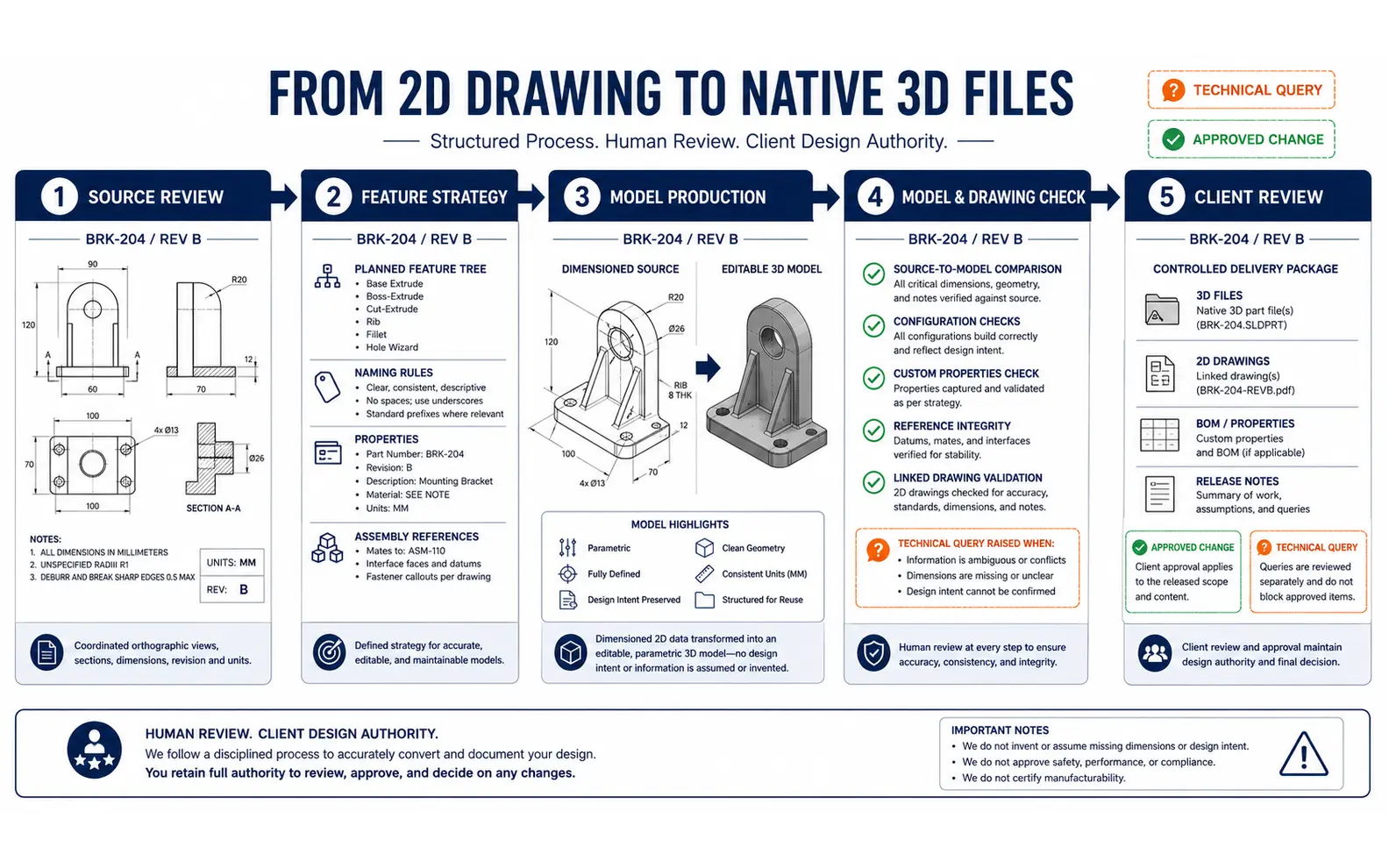
During 2D to SolidWorks conversion, drawings are reviewed as a set rather than as independent views. Orthographic projections, sections, details and dimensions must collectively define the component. Conflicts between views are captured before or during modeling.
We confirm drawing revision, units, projection method, component boundaries and the expected native and exchange deliverables.
The team records the intended feature approach, naming rules, properties, configurations and assembly references. A sample model can be used to approve these conventions.
Geometry is created from authorised dimensions and instructions. Technical questions stay connected to the relevant sketch, feature or source detail.
Key dimensions, feature states, configurations, custom properties, file references and drawing links are examined. The model is also compared visually with the source views.
Items requiring engineering judgement are submitted to the authorised reviewer. Approved changes are incorporated before the final package is organised.
This controlled approach supports SolidWorks 3D modeling outsourcing services while keeping design authority clearly separated from CAD production.
SolidWorks drawing creation can include orthographic views, sections, details, exploded views, bills of materials and client-approved annotations. Templates, sheet formats, drawing numbers, revision methods and property links are established at setup.
Model-driven views improve coordination, but they do not remove the need for checking. A qualified checker verifies that the intended configuration is shown, view references remain valid and client-issued dimensions, tolerances and notes appear correctly. An experienced coordinator can also review file names and drawing-to-model relationships across a large package.
AI-assisted processes may help classify source drawings, extract title-block data, compare file registers, identify repeated part families and prepare property information for validation. These uses can reduce repetitive administration on high-volume assignments.
AI does not create missing engineering intent, select a fit or approve a configuration. Every extracted value and modeled result remains subject to human review. This is how our qualified SolidWorks 3D modeling services use automation without allowing it to become an unaccountable design authority.
A component family, product range, equipment assembly or conversion package can be planned as a fixed assignment with agreed milestones and review gates.
Clients can assign externally SolidWorks 3D modeling when internal engineers face a release backlog, migration project or concentrated product-update period. Work can be divided by assembly, component class or priority.
Outsourced SolidWorks 3D modeling support can be arranged for regular parts, configurations, drawing updates and approved change requests. A current file register helps avoid work against superseded references.
As an experienced SolidWorks 3D modeling service provider, we recommend defining expected editability at the beginning. A model intended only for visual coordination should not be priced or structured as if it requires a carefully reconstructed parametric history.
We offer offshore SolidWorks 3D modeling services to project teams in the United States, Canada, European nations, the United Arab Emirates, Australia, South Africa, Singapore, Japan, Taiwan and India. Required SolidWorks version, file-transfer method, working schedule and client review contact are agreed before production.
Some companies assign externally a single legacy model rebuild; others extend capacity for a recurring stream of drawing-to-model work. We keep original sources, working files, reviewed outputs and final submissions organised according to the approved project structure.
The correct SolidWorks 3D modeling solution depends on model purpose, source completeness, expected feature logic and future revision needs. Organisations comparing a SolidWorks 3D modeling solutions company India can provide should therefore examine native-file quality, checking discipline and technical-query handling alongside capacity.
The team understood that we needed selected parts rebuilt, not a blanket conversion of every file. The resulting features and configurations are much easier for our engineers to maintain.
Oliver P., Product Configuration Manager, United Kingdom
Prototype differences were documented clearly instead of being treated as final design information. The completed model and drawing library now follows one controlled structure.
Amelia C., Technical Product Manager, Australia
The fortnightly batches fit our workload well. Native files follow our conventions, and the questions are organised around the relevant customer order.
Matthew R., Mechanical Design Coordinator, New Zealand
Yes, but direct import and native feature reconstruction are different services. The required level of editability should be defined after reviewing the geometry and expected future changes.
The required release should be confirmed before work begins. Native files generally cannot be opened in earlier SolidWorks versions, so delivery-version compatibility is important.
Yes. We can apply client-approved configuration rules, names, properties and templates. The client must validate the engineering suitability of every product variant.
Our core service is CAD modeling and drawing production. Safety, calculations, material suitability, tolerances, testing, regulatory compliance and manufacturing approval remain with the client’s qualified personnel unless separately agreed.
Send a representative drawing, imported model or existing SolidWorks file together with the required version, expected editability and downstream use. We will assess the source and recommend an appropriate production approach.
Request a SolidWorks Modeling Review